http://www.blackmoreops.com/2015/12/28/ip-spoofing-in-kali-linux-with-torsocks
This process is transparent to the user and if
Many applications do not directly support the use of SOCKS proxy.


That means my Public IP address is

Sweet as, now my Public IP changed to 197.231.221.211 because the URL was opened through the TOR proxy.
You should be able to use different application via
A configuration file named torsocks.conf is also provided for the user to control some parameters.
You can also use the
The following administrative applications are known to be compatible with
The following messaging applications are known to be compatible with
The following email applications are known to be compatible with
The following file transfer applications are known to be compatible with usewithtor:
Table legend:
Users from Iran, Pakistan, Egypt, China, Bangladesh, North Korea etc. where content filtering is done in National Level maybe it’s a way to get the voice out. I do not want to discuss the legality of that and will leave that to you. Using proxy is another way for spoofing IP addresses.
On a similar note, I’ve previously covered issues where you can DoS using spoofed IP Address, install and use TOR, creating hidden services in TOR like DarkNet or SilkRoad etc.
torsocks allows you to use most applications in a safe
way with TOR. It ensures that DNS requests are handled safely and
explicitly rejects any traffic other than TCP from the application
you’re using. In this post we will cover IP spoofing in Kali Linux with
torsocks which will allow users to connect to certain services that is
banned to them. torsocks is an ELF shared library that is
loaded before all others. The library overrides every needed Internet
communication libc function calls such as connect() or gethostbyname().This process is transparent to the user and if
torsocks
detects any communication that can’t go through the Tor network such as
UDP traffic, for instance, the connection is denied. If, for any
reason, there is no way for torsocks to provide the Tor anonymity guarantee to your application, torsocks
will force the application to quit and stop everything. In this
article I will guide you to IP spoofing in Kali using torsocks.Many applications do not directly support the use of SOCKS proxy.
torsocks enables such applications to use the tor SOCKS proxy.
Shell wrapper to simplify the use of the
torsocks library to transparently allow an application to use a SOCKS proxy.Installation
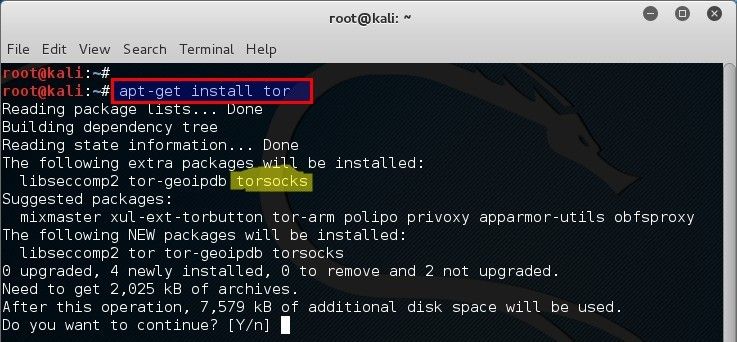
torsocks gets installed along with the tor package on Kali Linux or Ubuntu for example:root@kali:~# apt-get install tor (or) user@ubuntu:~$ apt-get install tor
Building from source code
Requirements
- autoconf
- automake
- libtool
- gcc
Installation
./configure
make
sudo make install
If you are compiling it from the git repository, run
./autogen.sh before the configure script.Using torsocks
Now all network connections s made by the telnet programs shall be routed through the tor proxy. There was many ways to get Public IP from Linux Terminal. To see the proxy effect try opening the the URL http://icanhazip.com/ through curl. The URL echos the public IP of the requesting user. Without proxy it would look something like this:root@kali:~# curl icanhazip.com 123.123.93.36 root@kali:~#
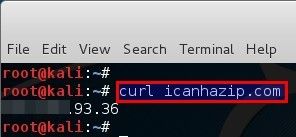
That means my Public IP address is
123.123.93.36. Now using it with torsocks.root@kali:~# torsocks curl icanhazip.com [Dec 28 20:20:26] PERROR torsocks[2979]: socks5 libc connect: Connection refused (in socks5_connect() at socks5.c:185) curl: (6) Could not resolve host: icanhazip.com root@kali:~#
Opps, that just means I forgot to start tor service. Start tor application using the following command:
root@kali:~# service tor start
root@kali:~#
Now try again:
root@kali:~# torsocks curl icanhazip.com
197.231.221.211
root@kali:~#
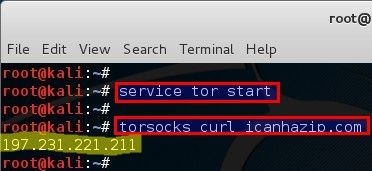
Sweet as, now my Public IP changed to 197.231.221.211 because the URL was opened through the TOR proxy.
You should be able to use different application via
torsocks using the following command:root@kali:~# torsocks [application]For example we want to use telnet and ssh command to connect through a SOCKS proxy. This can be done by wrapping the telnet command with
torify/usewithtor.root@kali:~# torsocks ssh username@some.ssh.com
root@kali:~# torify telnet google.com 80
root@kali:~# usewithtor telnet google.com 80
root@kali:~# torsocks iceweaselFor more details, please see the
torsocks.1, torsocks.8 and torsocks.conf.5 man pages. Also, you can use -h, --help for all the possible options of the torsocks script.A configuration file named torsocks.conf is also provided for the user to control some parameters.
You can also use the
torsocks library without the script provided:LD_PRELOAD=/full/path/to/libtorsocks.so your_app
Security
The tables below list applications thatusewithtor /torsocks
will send through Tor. At the moment a 100% guarantee of safe
interoperability with Tor can only be given for a few of them. This is
because the operation of the applications and the data they transmit has
not been fully researched, so it is possible that a given application
can leak user/system data at a level that neither Tor nor torsocks can control.The following administrative applications are known to be compatible with
usewithtor:| Application | 100% Safe | DNS | Comments |
| ssh | M | Y | Potential for identity leaks through login. |
| telnet | M | Y | Potential for identity leaks through login and password. |
| svn | M | Y | |
| gpg | M | Y | gpg --refresh-keys works well enough. |
usewithtor:| Application | 100% Safe | DNS | Comments |
| pidgin | M | Y | Potential for identity leaks through login and password. |
| kopete | M | Y | Potential for identity leaks through login and password. |
| konversation | M | Y | Potential for identity leaks through login and password. |
| irssi | M | Y | Potential for identity leaks through login and password. |
| silc | M | Y | Potential for identity leaks through login and password. |
usewithtor:| Application | 100% Safe | DNS | Comments |
| claws-mail | * | * | Use TorBirdy (Tor Button for Thunderbird) instead! |
| thunderbird | * | * | Use TorBirdy (Tor Button for Thunderbird) instead! |
| Application | 100% Safe | DNS | Comments |
| wget | N | N | Probable identity leaks through http headers. Leaks DNS and connects directly in certain cases when used with polipo and torsocks. http://pastebin.com/iTHbjfqM http://pastebin.com/akbRifQX |
| ftp | M | Y | Passive mode works well generally. |
DNS: DNS requests safe for Tor?
           N - The application is known to leak DNS requests when used with torsocks.
           Y - Testing has shown that application does not leak DNS requests.
100% Safe: Fully verified to have no interoperability issues with Tor?
           N - Anonymity issues suspected, see comments column.
           M - Safe enough in theory, but either not fully researched or anonymity can be compromised
               through indiscreet use (e.g. email address, login, passwords).
           Y - Application has been researched and documented to be safe with Tor.
Check the project homepage to find out what applications work well with torsocks . For example pidgin works with torsocks . Just launch it with the usewithtor commandusewithtor pidgin
Conclusion
TOR or torsocks is free, somewhat secure, allows you to bypass proxies, Firewall, monitoring and content filtering. Though, it can be natively blocked in Firewalls and Proxies. Its sometime is slow and sometime is not that secure you’d think. If you find that usingtorsocks or tor is just too slow for you, then you can always use VPN services like PrivateInternetAccess which is deemed one of the best and most secured. Find a great and lengthy article on setting up VPN services which I recommend for serious users.Users from Iran, Pakistan, Egypt, China, Bangladesh, North Korea etc. where content filtering is done in National Level maybe it’s a way to get the voice out. I do not want to discuss the legality of that and will leave that to you. Using proxy is another way for spoofing IP addresses.
On a similar note, I’ve previously covered issues where you can DoS using spoofed IP Address, install and use TOR, creating hidden services in TOR like DarkNet or SilkRoad etc.