Sunday, March 27, 2011

جديد القذافيات

قريبا بالأسواق 
الصحيح الكافي لتفسير كلام القذافي
*******
اللهم اقذف القذافي بقذيفة مقذوفة تقذفه في مقذفة التاريخ
********
عاجل
الجزيرة:
إبليس يصرح أنّه
غير مسئول عمّا يدور في دماغ القذافي
*******
القذافــي :
قدمت استقالتي من الحكم، لكني كرئيس للدولة لم اقبل الاستقالة
*********
لا رجــوع إلى الأمـام. نظـرية القـدافي الـجـديـدة
*********
عاجل
القذافى : الذين ماتوا فى المظاهرات سوف يندمون اشد الندم
*******
الى كل شخص لم يفهم على خطاب معمر القذافي اليكم النص الذي قرا منه خطابه .....
.
.
خطاب القذافي: أيتها الجماهير العريضة أين كنتم أنتم؟ بهب سعح كيه جقز شهث سها ينخمك والإمبريالية التوسعية، وين كنتم أنتم؟ عصخ كطح صهخ رء فخه طقخ وأمريكا حاربناها والسادات حاربناه ويهكق حضئ قهك فلا ها الإمبريالية التوسعية، وين كنتم أنتم؟، هؤلاء الموتورين الجرزان ها ضغف كزو خهع لايغ طجد الإمبريالية التوسعية
************


تفسير و ملخص خطاب القذافى أمبارح
:
إن الليبيين لازم يتحالفوا مع إخوانهم الليبيين ويثوروا على الليبيين علشان ليبيا تنتصر فى النهاية على كل الليبي
********
القذافي في مذكراته يؤكد أن السبب الأصلي للطلاق هو الزواج
 *********
القذافي سمع أن ابن علي "في غيبوبة" . . . ذهب للبحث في الخريطة : كم تبعد "غيبوبة" عن ليبيا؟؟
 ********
 القذافي في خطابه : "اخرجوا الليلة ابتداء من الغد
 *********
 دخل القذافي جهنم لقى فرعون فسأله : مين أنت ؟؟ قاله فرعون : أنا فرعون مصر ........... وأنت مين ؟؟ قله : أنا قذافي ليبيا ...... قاله فرعون : هلا والله جيت و الله جابك إلنا شهر أنا وعمك أبو جهل وعمك أبو لهب بنحاول نفهم شو اللي بدك ياه من خطابك تعال اقعد واشرحلنا
**********
أزياء القذافي........
. برعاية
سيدار
**********
أصبح شعار المظاهرات الجديد في ليبيا.
. الشعب .. يريد .. تفسير الخطاب
**********
كنا بنقول إن مبارك دكتاتور لأن في حكمه مر عليه خمس رؤساء أمريكان .. طب نقول أيه للقذافي اللي مر علية ٣ رؤساء مصريين!!!
********
منظمة محششين بلا حدود تطالب القذافي بالإفصاح عن الصنف الذي يتعاطاه

Thursday, March 10, 2011

Collectd, system performance statistics on Linux


collectd
In these days I have seen in a somewhat more detailed way collectd, an excellent tool for collecting statistics on various aspects of our Linux servers.

From Wikipedia: “collectd is a UNIX-daemon which collects, transfers and stores performance data of computers and network equipment.

The acquired data is meant to help system administrators maintain an overview over available resources in order to detect existing or looming bottlenecks.

The first version of the daemon was written in 2005 by Florian Forster and has been further developed as free open-source project.

Other developers have written improvements and extensions to the software that have been incorporated into the project.

Most files of the source code are licensed under the terms of the GNU General Public License, version 2 (GPLv2), the remaining files are licensed under other open source licenses”

Why collectd?
There are other free, open source projects that are similar to collectd – a few links are listed at the end of the article.

So why should you use collectd? There are some key differences of collectd.

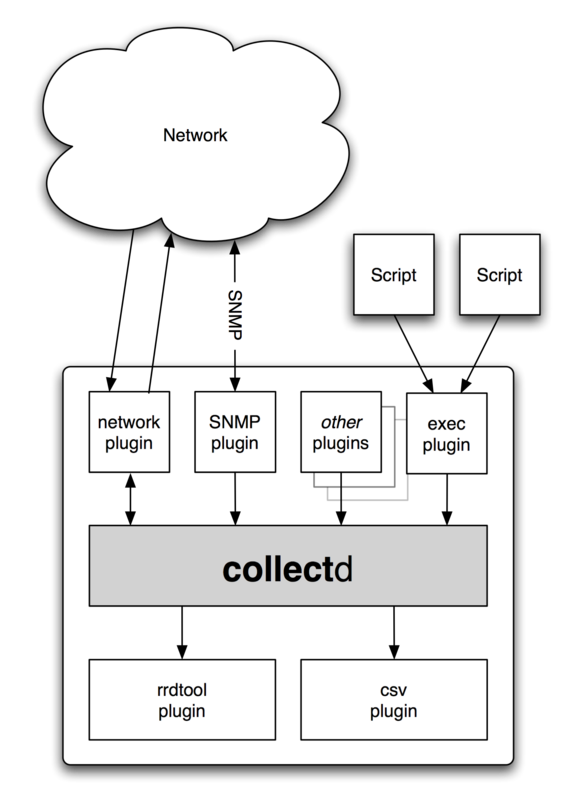
For one, it’s written in C for performance and portability, allowing it to run on systems without scripting language or cron daemon, such as embedded systems.

At the same time it includes optimizations and features to handle hundreds of thousands of data sets.

It comes with over 90 plugins which range from standard cases to very specialized and advanced topics.

It provides powerful networking features and is extensible in numerous ways. Last but not least: collectd is actively developed and supported and well documented.

Features

Modularity / Portabilitycollectd
Everything in collectd is done in plugins.

Well, except parsing the configfile.

This means that the main daemon doesn’t have any external dependencies and should run on nearly anything that has heard of POSIX.

The daemon has been reported as working on Linux, Solaris, Mac OS X, FreeBSD, NetBSD, and OpenBSD. It’s likely that other UNIX® flavors work to some extend, too.


Reasonable defaults


collectd’s configuration is kept as easy as possible: Besides which modules to load you don’t need to configure anything else, but you can customize the daemon to your liking if you want.


Build to scalecollectd is able to handle any number of hosts, from one to several hundred (or possibly thousand, but no one has reported that yet).

This is achieved by utilizing the resources as efficient as possible, e. g. by merging multiple RRD-updates into one update operation, merging the biggest possible number of values into each one network packet and so on.

The multithreaded layout allows for multiple plugins to be queried simultaneously – without running into problems due to IO-latencies.


SNMP supportThe Simple Network Management Protocol (SNMP) is in widespread use with various network equipment, for example switches, routers, rack monitoring systems, thermometers, UPSes, and so on.

The SNMP plugin provides a generic interface to the SNM-protocol which you can use to query values and dispatch them over collectd’s mechanisms, e. g. transmit them to a server instance somewhere else.


Integration with monitoring solutionsWith version 4.3 the concept of notifications and thresholds has been added to collectd. This allows you to send notifications through the daemon and allows for simple threshold checking.

However, collectd is not a monitoring solution. We will probably add some features to make the notification system more usable, but at the moment collectd is no match for a sophisticated monitoring solution.

To make it possible to integrate collectd into the popular monitoring solution Nagios, a “check” has been written for that.

It’s called collectd-nagios and allows you to use Nagios to monitor if certain values have been collected and if they were in an appropriate range.


Plugins example
Plugin-cpu
CPU
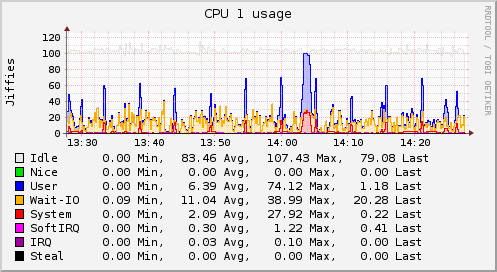
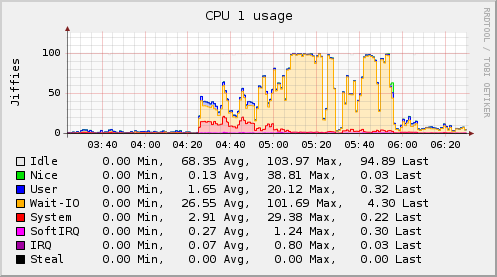
The CPU plugin collects the amount of time spent by the CPU in various states, most notably executing user code, executing system code, waiting for IO-operations and being idle.

This since has been an FAQ: The CPU plugin does not collect percentages. It collects “jiffies”, the units of scheduling.

On many Linux systems there are circa 100 jiffies in one second, but this does not mean you will end up with a percentage.


Apache
The Apache plugin queries the page generated by mod_status, the status module of the Apache web server, parses it and submits the number of bytes transfered, the number of requests received, and the number of processes in the various states of the scoreboard.

Memory
The Memory plugin collects physical memory utilization.

The values are reported by their use by the operating system. Under Linux, the categories are:
* Used
* Buffered
* Cached
* Free

Java_memory_eden_space


GenericJMX
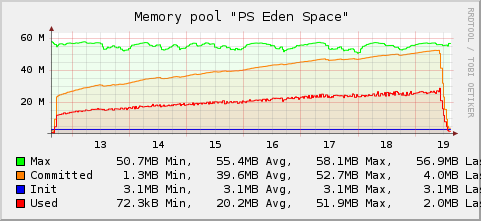
The GenericJMX plugin reads Managed Beans (MBeans) from an MBeanServer using JMX. The plugin is written in Java and requires the Java plugin to function.

The Java Management Extensions (JMX) is a generic framework to provide and query various management information.

The interface is used by the Java Virtual Machine (JVM) to provide information about the memory used, threads and so on.

These basic performance values can therefore be collected for every Java process without any support in the Java process itself.


MySQL
The MySQL plugin connects to an MySQL-database and issues a SHOW STATUS command periodically.

The command returns the server status variables, many of which are collected. The plugin has successfully been tested with the MySQL versions 4 and 5.

Reference:

Main site of Collectd


Similar projects
The following is a list of projects similar to collectd and a short note on how they differ from collectd.

Projects that focus on monitoring and do some performance measurement on the side are not on this list.
  • Ganglia
    Focus on compute clusters and basic system statistics.
  • Munin
    Data is collected by forking / executing plugins (i. e. scripts).
  • eLuna Graph System
    Written in Perl; relies on cron; local system only.

Popular Posts:

Tuesday, March 8, 2011

5 Excellent Linux Media Servers for the Enterprise

You can share your music, videos, and photos on your network via regular folder shares, but using a media server gives you additional functionality and lets you stream to more devices.


A Linux media server has a home in the enterprise because it's a superior tool for storing, archiving, and sharing company multimedia presentations.


Here are five different media servers that you can run on Linux machines:

MediaTomb

MediaTomb is an open source UPnP media server, implementing the UPnP MediaServer V 1.0 specification, released under the GNU General Public License (GPL).


It runs on x86, Alpha, ARM, MIPS, Sparc, and PowerPC with support for Linux, FreeBSD, NetBSD, and Mac OS X.


MediaTomb lets you watch or listen to your media from UPnP compatible media players and devices.


There's on-the-fly transcoding for converting content format not supported by the player or device.


In addition to browsing and playing your media you can view their metadata, such as album and artist or photo details, with EXIF thumbnail support.


You can even watch YouTube videos and create links to other Internet content to stream them via UPnP.


You're also provided with a web interface where you can add/remove/edit/browse your media from your computer or device with a browser.

There are binary packages available for Fedora, Debian and Ubuntu, Mac OS X, and several other distributions.


MediaTomb has a highly flexible configuration, giving you  ample control of the server. They offer great documentation on compiling from source, customization, and the user interface.

Jinzora Media Server
This is an open source web-based media streaming and management system, written in PHP and licensed under the GNU General Public License (GPL).


It can install on web servers supporting PHP in Linux, Windows, Mac OS X, and other platforms.


It can also be embedded in a content management system (CMS) or in another PHP-based application.


Its Groupware feature even lets you create a social network or community to discuss, request, and rate content.


Jinzora's themeable web interface doesn't only let you play or stream your media. It serves as an online media library, letting you create play lists and organize, search, and rate content.


Metadata is also supported. It even tries to download missing metadata, such as song lyrics, album covers and artist biographies.


Content can be played directly from the web interface. It can also be accessed via an external software or hardware player using the Streaming mode or pushed out to a player with the Jukebox mode.


Content can be transcoded or resampled to a media format or bit rate supported by the player.


For system requirements and installation help you can visit their help site.

Wizd
Wizd is an open source media server for Syabas-based media players and is released under Public Domain license.


It runs on Linux, Windows, and NAS platforms, requiring less than 10 MB of disk space. It streams to most media players with the Syabas middleware, including the following:
  • Buffalo LinkTheater
  • DigitalRise Xstream Player
  • H&B DNX-8620
  • I-O Data LinkPlayer
  • Omisys DVD PN210V
  • Pinnacle SC 200
  • Quartek I-Box 800
  • Quartek WHD-500
  • Snazio Net Cinema
  • Transgear DVX 500
  • Transgear DVX 700
From your media player you can browse your media through customizable skins. Thumbnail mode lets you easily preview your pictures and the bookmark feature lets you save your spot on MPEG movies. You can also read standard and ISO image DVD backups.

Firefly Media Server

The open source Firefly Media Server uses Apple's Digital Audio Access Protocol (DAAP) to share content with iTunes, Rhythmbox in Linux, and other players that support DAAP.


It's beneficial if you don't want to install or run iTunes on all PCs. It also features on-the-fly transcoding for converting content format not supported.


It's relatively easy to install and use, and features a web-based interface. Though the project isn't under active development, you may still be able to find packages for your distribution under the name mt-daap. Roku also provides the server for Windows and Mac OS X.


MythTV
MythTV  is much more than a traditional media server. Its main function is a digital video recorder (DVR) that gives you similar TV viewing, recording, and play-back functionality to what cable companies provide with set-top-boxes.


It can run on Linux, BSD, MacOS X, and Windows. It is an open source project distributed under the GNU General Public License (GPL). Since 2002 it has been under relatively heavy development and seems to be well maintained.


MythTV lets you watch and record analog and/or digital TV, including HDTV. You can pause, skip, and rewind live or recorded TV.


It features automated commercial detection and skipping so you see just the good stuff. You can also watch and archive DVDs.


The parental controls can help you limit what your children watch. You can manage the settings and recording schedule on the TV or remotely via a web browser.


In addition to the DVR functions, MythTV plug-ins give you the ability to stream photos and videos.


MythTV is comprised of server and client components. You can run the server and client on the same machine, or have one or more servers and clients depending upon how many TVs you want to setup.


Remember, you'll need at least one TV tuner card on the server. Some computers or video cards may also have an S-Video output you can use to get the MythTV interface onto your TVs.


Though MythTV provides great documentation, you may find the preparation and configuration of MythTV relatively lengthy.


Since you're working with video, the higher performance of the server and/or client PCs, the better.


The amount of streams you can simultaneously capture and watch is limited to the performance of the PCs.