Monday, November 26, 2012

Testing HTTP Status: 206 Partial Content and Range Requests

http://www.cyberciti.biz/cloud-computing/http-status-code-206-commad-line-test


The HTTP 2xx class of status codes indicates the action requested by the client was received, and processed successfully. HTTP/1.1 200 OK is the standard response for successful HTTP requests. When you type www.cyberciti.biz in the browser you will get this status code. The HTTP/1.1 206 status code allows the client to grab only part of the resource by sending a range header. This is useful for:
  1. Understanding http headers and protocol.
  2. Troubleshooting network problems.
  3. Troubleshooting large download problems.
  4. Troubleshooting CDN and origin HTTP server problems.
  5. Test resuming interrupted downloads using tools like lftp or wget or telnet.
  6. Test and split a large file size into multiple simultaneous streams i.e. download a large file in parts.

Finding out if HTTP 206 is supported or not by the remote server

You need to find file size and whether remote server support HTTP 206 requests or not. Use the curl command to see HTTP header for any resources. Type the following curl command and send a HEAD request for the url:
$ curl -I http://s0.cyberciti.org/images/misc/static/2012/11/ifdata-welcome-0.png
Sample outputs:
HTTP/1.0 200 OK
Content-Type: image/png
Content-Length: 36907
Connection: keep-alive
Server: nginx
Date: Wed, 07 Nov 2012 00:44:47 GMT
X-Whom: l3-com-cyber
Cache-Control: public, max-age=432000000
Expires: Fri, 17 Jul 2026 00:44:46 GMT
Accept-Ranges: bytes
ETag: "278099835"
Last-Modified: Mon, 05 Nov 2012 23:06:34 GMT
Age: 298127
The following two headers gives out information about this image file:
  1. Accept-Ranges: bytes - The Accept-Ranges header indicate that the server accept range requests for a resource. The unit used by the remote web servers is in bytes. This header tell us that either server support download resume or downloading files in smaller parts simultaneously so that download manager applications can speed up download for you. The Accept-Ranges: none response header indicate that the download is not resumable.
  2. Content-Length: 36907 - The Content-Length header indicates the size of the entity-body i.e. the size of the actual image file is 36907 bytes (37K).

How do I pass a range header to the url?

Now, you know you can make a range request to the url. You need to send GET request including a range header:
 
Range: bytes=0-1024
 
The exact sequence should be as follows. First, send HTTP/1.1 GET request:
 
GET /images/misc/static/2012/11/ifdata-welcome-0.png HTTP/1.1
 
Next, send the Host request-header to specifies the Internet host and port number of the resource being requested, as obtained from the original URI given by the user or referring resource:
 
Host: s0.cyberciti.org
 
Finally, send Range header request that specifies the range of bytes you want:
 
Range: bytes=0-1024
 

telnet command example

The telnet command allow you to communicate with a remote computer/server that is using the Telnet protocol. All Unix like operating systems including MS-Windows versions include Telnet Client. To start Telnet Client and to enter the Telnet prompt, run:
 
telnet your-server-name-here www
telnet your-server-name-here 80
 
To connect to remote server s0.cyberciti.org through port number 80, type:
 
telnet s0.cyberciti.org 80
 
Sample outputs:
Trying 54.240.168.194...
Connected to d2m4hyssawyie7.cloudfront.net.
Escape character is '^]'.
In this example, make range requests (0-1024 bytes) with s0.cyberciti.org to grab /images/misc/static/2012/11/ifdata-welcome-0.png, type:
GET /images/misc/static/2012/11/ifdata-welcome-0.png HTTP/1.1
Host: s0.cyberciti.org
Range: bytes=0-1024
Sample outputs:
Fig.01: Telnet command Range-requests bytes header example  (HTTP 206)
Fig.01: Telnet command Range-requests bytes header example (HTTP 206)
Where,
  1. Output section #1 - GET request.
  2. Output section #2 - HTTP Status: 206 partial content and range requests header response.
  3. Output section #3 - Binary data.

curl command

The curl command is a tool to transfer data from or to a server. It support HTTP/FTPSFTP/FILE retrieval using a byte range i.e a partial document from a HTTP/1.1, FTP or SFTP server or a local FILE. Ranges can be specified in a number of ways. In this example, retrieve ifdata-welcome-0.png using two ranges and assemble it locally using standard Unix commands:
 
curl  --header "Range: bytes=0-20000" http://s0.cyberciti.org/images/misc/static/2012/11/ifdata-welcome-0.png -o part1
curl  --header "Range: bytes=20001-36907" http://s0.cyberciti.org/images/misc/static/2012/11/ifdata-welcome-0.png -o part2
cat part1 part2 >> test1.png
gnome-open test1.png
 
Or use the -r option (pass -v option to see headers):
 
curl  -r 0-20000 http://s0.cyberciti.org/images/misc/static/2012/11/ifdata-welcome-0.png -o part1
curl  -r 20001-36907 http://s0.cyberciti.org/images/misc/static/2012/11/ifdata-welcome-0.png -o part2
cat part1 part2 >> test2.png
gnome-open test2.png
 

How do I enable Accept-Ranges header?

Most web server supports the Byte-Range request out of the box. Apache 2.x user try mod_headers in httpd.conf:
Header set Accept-Ranges bytes
Lighttpd user try the following configuration in lighttpd.conf:
 
## enabled for all file types ##
server.range-requests = "enable"
## But, disable it for pdf files ##
$HTTP["url"] =~ "\.pdf$" {
    server.range-requests = "disable"
}
 

Not a fan of command line interfaces?

You can view HTTP headers of a page and while browsing. Try the following add-ons:

Conclusion

This post explained, how to find out HTTP headers and a response status. You can use 206 HTTP status code to grab a large file in parts. If the offset is valid, the server will return an HTTP 206 status code. If the offset is invalid, the request will return an HTTP 416 status code (Requested Range Not Satisfiable).

Recommend readings

Thursday, November 22, 2012

Top Open Source Learning Management Systems

http://linux-news.org/index.php/2012/11/21/top-open-source-learning-management-systems


Open source Learning Management Systems have become extremely popular in recent years, but what does open source mean? Open Source technology is technology where the source code is “open”, that is, the code is available to the public and free to be modified. Improvements can be made by developers and it can be spread or sold to the wider community. So, why should an organization choose an open source Learning Management System as opposed to a homegrown or proprietary Learning Management System?
 

  • Firstly, if a company uses a proprietary Learning Management System, they must rely on the provider to maintain and service the Learning Management System, as well as provide support when problems occur.
  • As the code is widely available in open source Learning Management Systems, many developers read and examine the code, resulting in bugs being identified and fixed much faster than proprietary programs.
  • Open Source technology is very beneficial to schools, universities and other educational institutions as well as corporations.
  • Open Source Learning Management Systems are fully flexible and customizable, so they can be designed in line with your school/organization brand image.
  • There are no license or hardware costs associated with open source technology so it is free to start using it and carries minimal risk.

Open Source Learning Management Systems can also be converted to social learning platforms. You can create an online community through your Learning Management System. For example your learners can chat, blog, connect to social network sites (facebook etc.) and have polls on your open source Learning Management System. This blog post details how you can combine Google + with you Learning Management System.
Top 6 Open Source Learning Management Systems
With the huge number of Learning Management systems available today, making the decision on which platform to choose can be quite overwhelming. Below I have written brief explanations on 6 of the best systems currently available.
Moodle
Moodle is an abbreviation for “Modular Object-Oriented Dynamic Learning Environment” although when it was first developed the M stood for Martin’s after its developer, Martin Dougiamas. Moodle has been around for over ten years, with the first version in August 2002.
Features:

  • Very, very easy for first time users.
  • Easy generation of PDF documents.
  • Quick establishment of courses.
  • All grades for assignments and quizzes etc. can be viewed on one sheet and downloaded as a spreadsheet.
  • Teachers/Instructors can add multiple files very easily by dragging and dropping.

.LRN
.LRN (dot learn) was originally developed at MIT and is used by almost 500,000 people in educational institutions, corporations and government in over 18 countries.
Features:

  • Homework drop box.
  • Scorm Display
  • Student tracking data can be exported
  • Different roles are supported for.LRN Classes, such as students, professors and administrative staff
  • LRN has been internationalized to support multiple languages, dialects and timezones

However, it’s main flaw is that it has a very diverse interface with many inconsistencies.
eFront
The basic version of eFront is exactly that, basic, but this can be amplified with modules downloadable from the eFront site. The thought process behind this decision was so that users spend time learning new skills, not learning how to use the platform. There are two efront Learning Management platforms, an educational edition and an enterprise edition. The enterprise edition was aimed at medium sized enterprises with between 100 and 10,000 employees. Extensive research on organizations of this size was conducted before development began.
Features:

  • Visually attractive interface
  • Very fast and modern as it is Ajax enabled
  • Unicode, LDAP and SCORM supporting
  • Multilingual
  • Advanced security characteristics

Dokeos
This particular Learning Management System is available in three versions, the original free open source version, a pro version and a specific medical version. It is possible to build visual learning without graphical expertise.
Features:

  • Convert Office documents into Learning Paths
  • Content authoring tools
  • Video conferencing tools
  • Synchronization with HR Management systems
  • Print Certificates

Sakai
Sakai was designed by universities, for universities. It was built by MIT, Stanford and Berkeley amongst others so they did not need to use homegrown systems or pay vendors. It aims to be very well suited to group projects and describes itself as a Collaborative Learning Environment (CLE).
Features:

  • Site roster
  • View site usage statistics
  • Display external web pages
  • Create new Sakai sites from templates with pre-loaded tools
  • Contains tools for portfolio based activities

Because Sakai is mainly coded in Java it can cause problems, especially if using older versions of browsers. It can also be difficult to find programmers with Java skills.
ATutor
ATutor differs slightly from the other systems as it is actually a Learning Content Management System (LCMS). The A stands for accessible, and accessibility is its best feature. Also, user navigational patterns can be tracked so instructors can see students use of the site and students can track their own use.
Features:

  • Print Compiler to print notes or transcripts of discussions
  • SCORM and IMS packages can be imported
  • Easy course creation (although difficult with different types of content)
  • Easily accessible and adaptable
  • The file storage feature has a version control feature to keep track of changes and drafts

A negative aspect of this particular platform is that the Java Runtime Environment must be installed on the client side for SCORM tracking. Also, course elements can’t be bookmarked.
Conclusion
To conclude, of the six Learning Management Systems listed above, Moodle is by far the most popular, and in our opinion, the best. It has over 62 million users worldwide. On top of the features listed above, here are some other reasons we believe Moodle should be your number one choice for an open source Learning Management System.
Repositories - With Moodle it is very easy to import files from Flickr, Google Docs, Dropbox, Youtube etc. These files can all be saved together in one location for ease of access later.
Discussion boards - The Moodle Community is full of discussion boards in many different languages, therefore users can communicate with people from outside your organization as well as your employees.

Support - There are a plethora of support options for Moodle users. On the Moodle site you can find books and manuals, documents including frequently asked questions, and a forum where you can ask questions. The forums usually have plenty of other users and even computer programmers who are happy to offer help, advice and recommendations, whatever the issue.

3 Open Source School Management Software for Teachers and Students

http://linuxaria.com/article/open-source-school-management-software-for-teachers-and-students?lang=en


Around 1 month ago Jason posted an article related to Educational software that run on Linux (or even Linux distributions done with that goal), today he return on that topic with another roundup of software useful for schools.
Many educators might have been hesitant in the past regarding embracing open source software. But not any more as the number that has taken to open source software (OSS) has increased significantly over the years. As more teachers as well as institutions are now engaging with organizations such as Open Source Schools, SchoolForge among others. Consequently, these educators have begun to realize the potential inherent in OSS that can help transform education in many ways.
Now here is a list of open-source applications that is available to assist educators in teaching as well as in inspiring their students:


Opensis

openSIS otherwise known as “Open Source Student Information System” is a school administration application. And, it claims to reduce ownership cost for a school district by as much as 75% when compared with commercial systems of the same capability.
This application includes
  • attendance: By period, by day, with comments and all accomplished with a only a few clicks. Customize attendance codes to meet your specific needs. Easily check attendance by using the built-in reports.
  • contact information: Easily add contact information for parents, relatives and authorized individuals. Designate legal guardian, bus stops and associate parents with students enabling automatic access to the openSIS parent portal.
  • student demographics : openSIS enables the tracking of numerous student demographic attributes in a permanent record and across enrollments. Need something not included in the base installation? Use the custom categories and fields that allow you to easily create any number of custom fields to capture any specific data needs.
  • gradebook: The built in grade book allows teachers to enter homework assignments, class tests and any other activity using weighted scales if desired. Automatic tallying of grades, reports to find erroneously entered grades and advanced ad hoc reporting is included.
  • scheduling: openSIS includes a scheduler that allows you to easily input student requests and mass schedule students. You can make multiple schedule runs as you make adjustments and have multiple schedules within a school. View and print student schedules and class rosters with just a few clicks.
  • health records: Nurses visits, immunizations, physician contact information, allergies and more are all a part of the health records.
  • report cards: Easily input final grades, create student report cards and calculate GPA’s and class rankings.
The solutions is a 100% web-based application and has polished looks, a great deal of required functionality and appears to be easy to use based on the online demo website. openSIS is developed and maintained by Open Solutions for Education.
openSIS is written in the PHP programming language and uses the MySQL database system to store information. The community edition is released under the terms of the GNU General Public License, is free software and can be downloaded from the Sourceforge website.
opensis

Epoptes

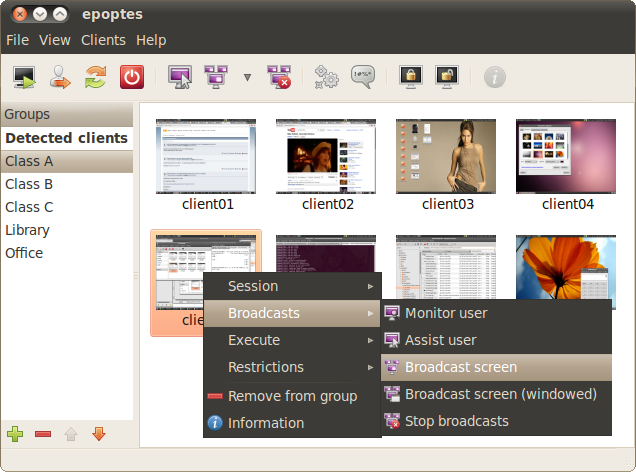
Epoptes (Επόπτης  - a Greek word for overseer) is an open source computer lab management and monitoring tool. It allows for screen broadcasting and monitoring, remote command execution, message sending, imposing restrictions like screen locking or sound muting the clients and much more!
It can be installed in Ubuntu, Debian and openSUSE based labs that may contain any combination of the following: LTSP servers, thin and fatclients, non LTSP servers, standalone workstations, NX or XDMCP clients etc.
It’s a partial rewrite of an older application called sch-scripts, which has been successfully used the last year in about 250 Greek schools. Epoptes already has a lot of features, but a lot more are planned, and it’s being developed at a very fast pace. It’s maintained by IT teachers and students, so it should be around for a long time!
epoptes

Fedena

Fedena is a free & opensource school management software that has more features than a student information system. Use fedena to efficiently manage students, teachers, employees, courses & all the system & process related to your institution.
Fedena gives you complete control over how you want to manage your school’s databases and provides many tools to organize its activities. It is a complete SIS plus with all the advantages of a perfect school ERP. With fedena there is no need of any extra hardware or technical maintenance staff. All you need is a computer with internet connection. You can operate fedena even with a mobile phone.
The official website claims that anyone with basic knowledge in computers will be able to use Fedena on first login without any instructions, but if you want support there is also a commercial site at www.fedena.com that can help you in the setup of the product.
Fedena is used by the Education Department of Government of Kerala to automate the system and process of over 15,000 schools in the state and is named as Sampoorna
Fedena is developed on the powerful Ruby on Rails framework and a demo is available at this url


Conclusion

The benefits of making use of open source software or application can be said to be as follows: One it helps save money, which can now be used for other important things. Secondly, it gives educators several more options. Since there are so many applications that can help with teaching different subjects as well as with school administration as a whole.