https://opensource.com/life/15/12/5-open-source-web-apps-self-hosted

Last year, Kenton Varda and I ran a successful fundraising campaign that let us build Sandstorm.
During the campaign, he published a treatise on how open source and
indie software has proliferated on desktop and mobile, yet stagnated on the web because decentralized hosting has historically been so difficult.
Non-technical users comprise most of humanity, so that's where Sandstorm is setting the usability bar. We've come a long way since last year—we launched the App Market, managed hosting, and free automated dynamic DNS & SSL certs for self-hosters, to name a few milestones.
I'd like to take a moment to highlight some of my favorite open source web apps that have become part of my work and life routine. Before we dive into the apps, let's give a shoutout to the Sandstorm community, and in particular, the awesome folks who authored and/or packaged these apps. Be sure to check out the demos for each app. Demo accounts last for one hour, but you can sign into Oasis, our managed hosting, to keep your data in a free basic account or self-install on your own hardware.
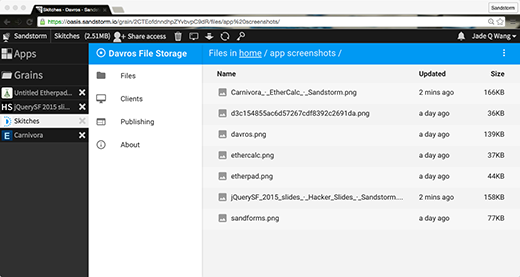
Davros is essentially Dropbox or Google Drive style file sync and storage, but running on hardware that you control, wherever you want to install it. As soon as it came out earlier this month, I immediately 1) Installed it and created a grain for my Skitches, 2) Installed the ownCloud client on my laptop, and 3) Copy-pasted the key from my Davros instance ("grain"). In under a minute, I had everything working, and most of that minute was downloading the ownCloud client.
Since I capture and annotate screenshots for filing bug reports and other things almost every day, I've often felt a bit awkward about keeping those hosted by Evernote (who acquired Skitch in 2011). How can I really be sure if they've deleted a backup of someone else's bug (or some other potentially embarrassing photo)? Thanks to Michael Nutt's Davros, I can sync my files to my own server.
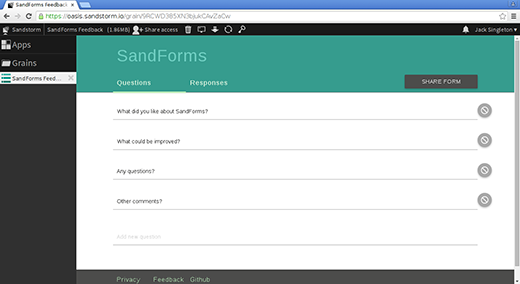
SandForms is an open source alternative to Google Forms. It was developed by a team at ThoughtWorks that worked closely with the journalists and activists for whom Sandstorm's security features are of vital importance, as well as the Radical Librarians Collective and the Library Freedom Project.
That thing is beautiful. Seriously, give it a spin. I always love it when the open source apps are heads and shoulders above their conventional brethren in design, usability, and polish.
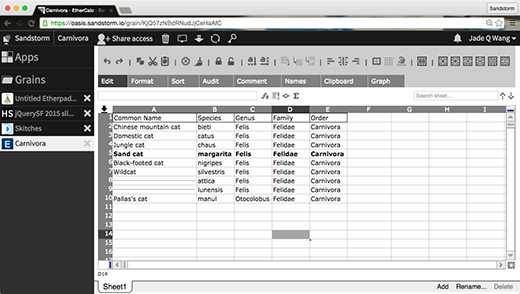
EtherCalc is a real-time collaborative spreadsheet built by Audrey Tang. It does all the things you expect a collaborative spreadsheet like Google Spreadsheets to do, except you can install it on your own server and have control over your data.
Audrey has also written a fascinating history of EtherCalc (and its predecessors, WikiCalc and SocialCalc) for the book series The Architecture of Open Source Applications. These chapters are also available on the EtherCalc web site. It's a technically meaty read that does multiple deep dives into how each feature was implemented, optimizing for the performance of various features, the constraints they were solving for the environments in which each of these spreadsheet apps were designed to be deployed, and more. Great stuff!
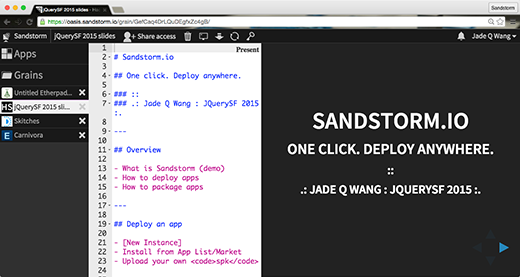
HackerSlides lets you write your slides in Markdown into an Ace Editor while showing you a live preview on the right with Reveal.js. I've used it to write and present just about every presentation I've given since it came out (one exception for a conference that mandated a slide template). Personally, I prefer writing my slides in Markdown as I find it's so much faster to write without fussing about and moving boxes around with my mouse.
HackerSlides' author, Jack Singleton, gave a talk about it at Chaos Communication Camp earlier this year (video) and gathered a team of his colleagues to work on SandForms.
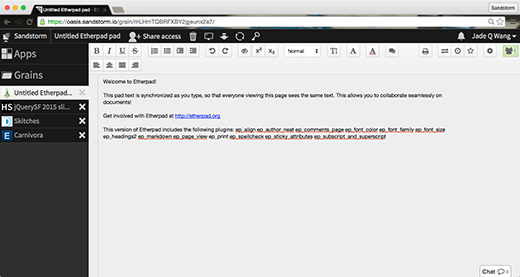
Etherpad is a real-time collaborative document editor, like Google Docs, but running on your servers, not Google's. After Appjet (the original author) was acquired by Google, they open sourced the Etherpad code, where it is currently maintained for the community by John McLear and friends at the Etherpad Foundation.
Etherpad is one of the most popular open source web apps. Large groups like Mozilla and Wikimedia run instances, and so do small activist groups like La Quadrature du Net. By contrast, I self-host Etherpad on Sandstorm, where I get two practical advantages over using a shared instance: Sandstorm shows me a list of Etherpad documents I've created, and it adds security sandboxing to every app. The security features have mitigated a number of real Etherpad security issues.
This is the only app in the list maintained by someone on the Sandstorm core dev team, by the way. All four other apps are packaged for Sandstorm by the community that created them.
Want to try out new apps before they get into the App Market? Want to help app authors test their almost-ready apps? Join the sandstorm-dev mailing list to help out, and be sure to assist open source app authors by reporting bugs and edge cases on their repo. I love community-driven development because everyone gets to pitch in and participate, and we're all in this together, creating better technology for everyone.
Want to connect with other open source enthusiasts who like to self-host? Join or create a Sandstorm meetup group; it's a great opportunity to show and tell your latest and greatest open source app, or learn from local experts and get help on your work in progress. Put your city on the map via this SandForms survey, and I'd love to help you get started.
Stay tuned for my upcoming roundup of open source alternatives to other popular SaaS apps. Or explore the App Market and write about your favorites.
Non-technical users comprise most of humanity, so that's where Sandstorm is setting the usability bar. We've come a long way since last year—we launched the App Market, managed hosting, and free automated dynamic DNS & SSL certs for self-hosters, to name a few milestones.
I'd like to take a moment to highlight some of my favorite open source web apps that have become part of my work and life routine. Before we dive into the apps, let's give a shoutout to the Sandstorm community, and in particular, the awesome folks who authored and/or packaged these apps. Be sure to check out the demos for each app. Demo accounts last for one hour, but you can sign into Oasis, our managed hosting, to keep your data in a free basic account or self-install on your own hardware.
1. Davros (personal file sync and storage)
Davros is essentially Dropbox or Google Drive style file sync and storage, but running on hardware that you control, wherever you want to install it. As soon as it came out earlier this month, I immediately 1) Installed it and created a grain for my Skitches, 2) Installed the ownCloud client on my laptop, and 3) Copy-pasted the key from my Davros instance ("grain"). In under a minute, I had everything working, and most of that minute was downloading the ownCloud client.
Since I capture and annotate screenshots for filing bug reports and other things almost every day, I've often felt a bit awkward about keeping those hosted by Evernote (who acquired Skitch in 2011). How can I really be sure if they've deleted a backup of someone else's bug (or some other potentially embarrassing photo)? Thanks to Michael Nutt's Davros, I can sync my files to my own server.
2. SandForms (Google Forms alternative)
SandForms is an open source alternative to Google Forms. It was developed by a team at ThoughtWorks that worked closely with the journalists and activists for whom Sandstorm's security features are of vital importance, as well as the Radical Librarians Collective and the Library Freedom Project.
That thing is beautiful. Seriously, give it a spin. I always love it when the open source apps are heads and shoulders above their conventional brethren in design, usability, and polish.
3. EtherCalc (real-time collaborative spreadsheet)
EtherCalc is a real-time collaborative spreadsheet built by Audrey Tang. It does all the things you expect a collaborative spreadsheet like Google Spreadsheets to do, except you can install it on your own server and have control over your data.
Audrey has also written a fascinating history of EtherCalc (and its predecessors, WikiCalc and SocialCalc) for the book series The Architecture of Open Source Applications. These chapters are also available on the EtherCalc web site. It's a technically meaty read that does multiple deep dives into how each feature was implemented, optimizing for the performance of various features, the constraints they were solving for the environments in which each of these spreadsheet apps were designed to be deployed, and more. Great stuff!
4. HackerSlides (Minimalist presentation editor)
HackerSlides lets you write your slides in Markdown into an Ace Editor while showing you a live preview on the right with Reveal.js. I've used it to write and present just about every presentation I've given since it came out (one exception for a conference that mandated a slide template). Personally, I prefer writing my slides in Markdown as I find it's so much faster to write without fussing about and moving boxes around with my mouse.
HackerSlides' author, Jack Singleton, gave a talk about it at Chaos Communication Camp earlier this year (video) and gathered a team of his colleagues to work on SandForms.
5. Etherpad (Real-time collaborative document editor)
Etherpad is a real-time collaborative document editor, like Google Docs, but running on your servers, not Google's. After Appjet (the original author) was acquired by Google, they open sourced the Etherpad code, where it is currently maintained for the community by John McLear and friends at the Etherpad Foundation.
Etherpad is one of the most popular open source web apps. Large groups like Mozilla and Wikimedia run instances, and so do small activist groups like La Quadrature du Net. By contrast, I self-host Etherpad on Sandstorm, where I get two practical advantages over using a shared instance: Sandstorm shows me a list of Etherpad documents I've created, and it adds security sandboxing to every app. The security features have mitigated a number of real Etherpad security issues.
This is the only app in the list maintained by someone on the Sandstorm core dev team, by the way. All four other apps are packaged for Sandstorm by the community that created them.
One login, one workspace
When I used to use conventional SaaS apps from various developer-hosts, I had to log in separately into each service, entrust them with my data, and hope that they never pulled the plug on an app that I loved. These days, when I deploy apps I use on Sandstorm, I can have all my data in one place and share access with my collaborators. Most importantly, my data lives on hardware that I control.Get involved
Want to make your own apps available to the Sandstorm community and self-hosters everywhere, regardless of their sysadmin skills? Check out this packaging tutorial, and drop a line to the sandstorm-dev mailing list with any questions. (Maybe even ask for a community review of your app before it goes live!) By default, your app will also get a one-click live demo to help your users try out a fresh instance of your app before installing it, and we'll even help you out with app icons if you need the help.Want to try out new apps before they get into the App Market? Want to help app authors test their almost-ready apps? Join the sandstorm-dev mailing list to help out, and be sure to assist open source app authors by reporting bugs and edge cases on their repo. I love community-driven development because everyone gets to pitch in and participate, and we're all in this together, creating better technology for everyone.
Want to connect with other open source enthusiasts who like to self-host? Join or create a Sandstorm meetup group; it's a great opportunity to show and tell your latest and greatest open source app, or learn from local experts and get help on your work in progress. Put your city on the map via this SandForms survey, and I'd love to help you get started.
Stay tuned for my upcoming roundup of open source alternatives to other popular SaaS apps. Or explore the App Market and write about your favorites.